
Make Every Audience Part of the Conversation
Let your audience ask questions, vote on top topics, and join the conversation in real time. Works directly in any browser with Zoom, Google Meet, or live events without downloading anything.
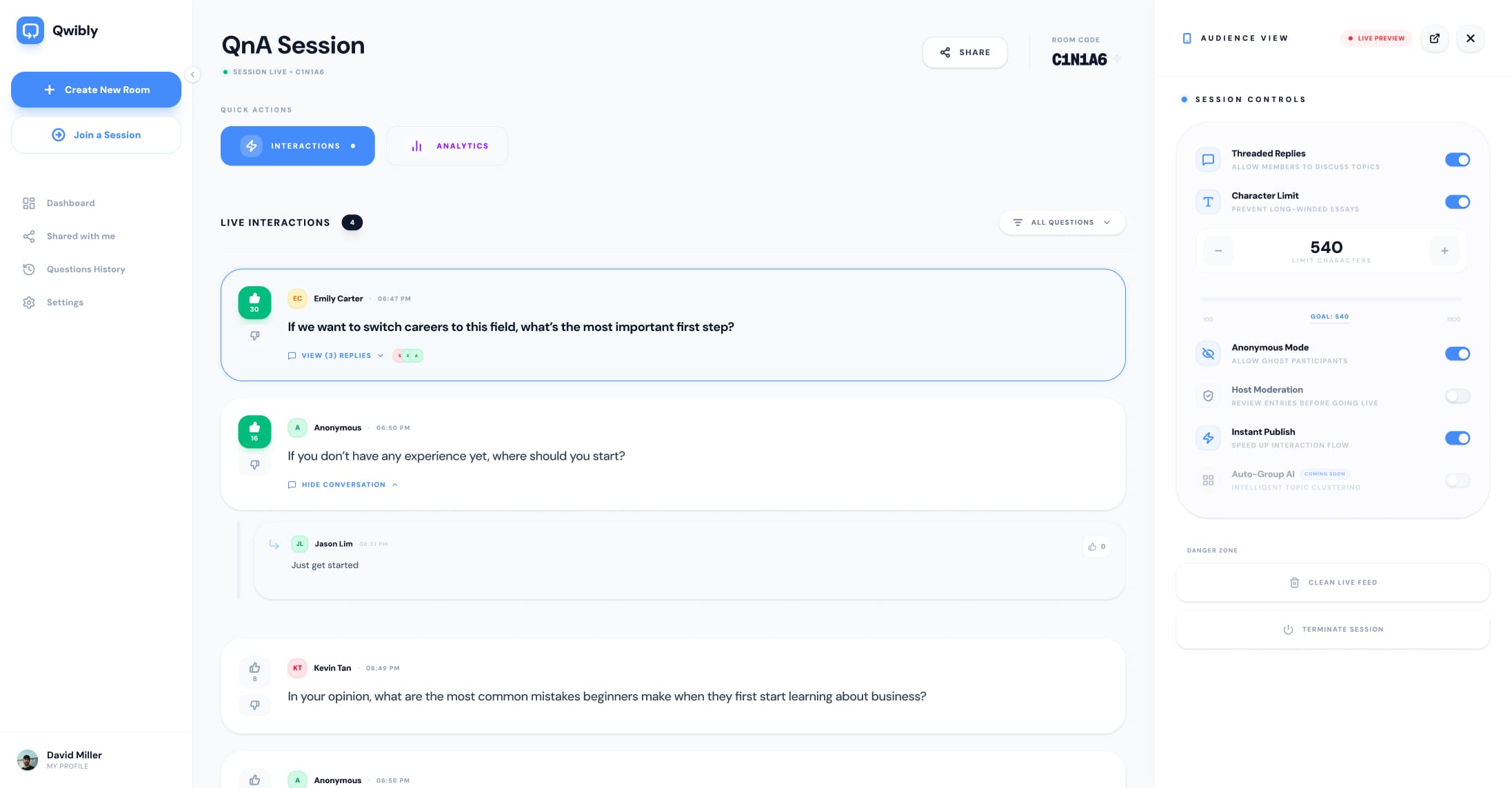
Engagement is hard.
We make it easy.
The Old Way
Presentations feel like one-way streets pushing audiences to sleep.
Silent audiences who hesitate to speak up in front of everyone.
Great questions get lost in messy zoom chat boxes.
The Qwibli Way
Fully interactive and real-time engagement that wakes people up.
Feels like a vibrant social platform, not a boring poll.
Threaded discussions let the whole room co-create value.
How Qwibli's Live Q&A Works
Three simple steps to transform your audience into active participants.
Create a Room
Launch a new session with just one click. Absolutely no downloads or complicated setup.
Share the Code
Display your 6-digit code on screen. Participants join instantly via their mobile browser.
Start Interacting
Watch ideas flow. Upvote, reply, and build a vibrant real-time discussion together.
Everything You Need for Live Audience Engagement
Live Upvoting Engine
Let your audience surface the best ideas organically. Top questions naturally float to the top.
Structured Q&A
Keep the conversation organized. Give participants a clean way to ask anything without the noise.
Threaded Replies
Don’t just ask questions encourage discussion. Give your audience the opportunity to respond to one another
Smart Moderation
Approve or dismiss questions before they go live safely.
Anonymous Mode
Encourage shy audiences by letting them ask safely.
Loved by people who
hate boring meetings.
From quiet classrooms to global town halls, here’s how Qwibli is helping hosts actually connect with their audience.
at Termester Global, Inc.
Finally, a tool that doesn't feel like a boring poll. Qwibli is intuitive, looks beautiful on screen, and makes everyone in the room feel like they're part of the conversation, not just watching a slideshow.
at Loro, Inc.
Anonymous mode is a lifesaver for our internal town halls. It finally gave my team a safe space to ask the 'tough' questions we actually needed to address. It has built so much trust within our company.
at Northstars, Inc
I used to dread the 'Any questions?' part of my lectures, just total silence. Now, with the upvoting engine, the best questions rise to the top and the students actually engage with each other through the threads. It’s a game-changer.
at Vortex Events
Qwibli changed everything for our virtual conferences. The real-time interaction feels so natural, and the fact that there's nothing to download means we get 3x more questions than we used to with old-school chat boxes.
Make Every Meeting
More Interactive
Qwibli works seamlessly as a live Q&A tool alongside your favorite video conferencing platforms. Whether you're hosting a webinar on Zoom, a team meeting on Google Meet, or a virtual conference on Microsoft Teams — simply share your Qwibli room code and your audience can start engaging instantly.
Works perfectly with your favorite meeting platforms
 Google Meet
 Zoom
Zoom Microsoft Teams
 Discord
 Webex
Webex Twitch
 Jitsi
Jitsi GoTo
GoTo KumospaceGoogle MeetZoomMicrosoft TeamsDiscordWebexTwitchJitsiGoToKumospaceGoogle MeetZoomMicrosoft TeamsDiscordWebexTwitchJitsiGoToKumospace
Everything you’re wondering about.
From Passive to Participative
Create a Qwibli room and experience live interaction that feels
truly alive and vibrant